HVAC · Plumbing · Cleaning
Home services direct mail for nearby jobs.
Sendvo helps HVAC, plumbing, cleaning, and other home service teams mail nearby homes, past customers, or a whole EDDM route. Design the postcard and see the exact cost before you send.
- Free Local plan
- Exact cost before you send
- No contract


sample designs
- per EDDM postcard, all-in
- $0.65
- smallest EDDM send (200 cards)
- $130
- per 4×6 postcard, Local
- $0.92
- setup fees
- $0
Audience
Draw the area your crew can reach.
Draw it on a map or pick ZIP codes. Sendvo finds the homes and checks every address.
How maps and targeting work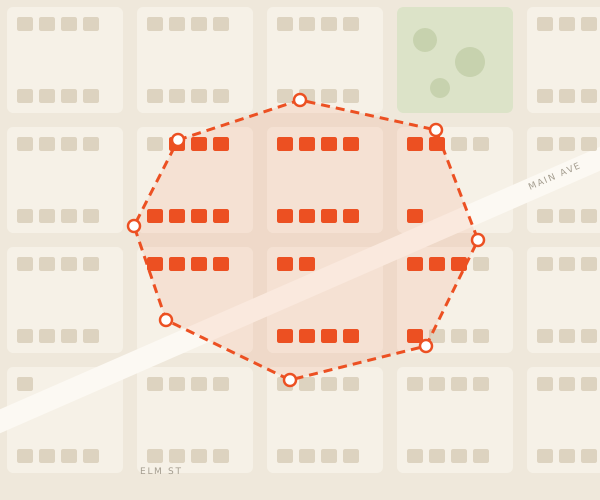 Sample campaign
Who to mail
Three ways to reach the right homes.
-
Local targeting
Your service area
Nearby homes by map or ZIP.
Explore local targeting -
Owned list
Past customers
Upload your list for callbacks and win-backs.
Prepare a list -
EDDM
Every door on a route
No list needed. $0.65 a card.
Compare EDDM services and pricing
Design + approve
Approve the card and the exact cost.
Nothing prints until you approve the proof and the all-in price.
See how design works
Campaign ideas
One job. One reason to call.
-
Spring tune-up$79AC check-up
Neighborhood Heating & Air
HVAC
Seasonal tune-up
Mail before the summer rush.
Read the HVAC guide -
Leak checkBefore the freeze.Pipes ready?
 Corner Plumbing Co.
Plumbing
Weather-prep reminder
Cover a route before the first freeze.
Read the plumbing guide -
Spring cleanBright Home Cleaning
Cleaning
Recurring or move-out clean
One offer to the homes nearby.
Read the cleaning guide
Use Jobber or ServiceTitan? Read the CRM postcard guide.
Tracking
Know where every addressed postcard is.
- Piece-level statusPrinted, sorted, mailed, delivered.
- Count the callsAdd a tracking number, QR code, or short URL.
- Send it againReuse it next season.
- Total
- 1,184
- Printed
- 1,184
- In transit
- 391
- Delivered
- 793
| Piece | ZIP | Street | Status |
|---|---|---|---|
| #04112 | 94110 | Oak Ln | Delivered |
| #04113 | 94110 | Elm St | In transit |
| #04114 | 94110 | Maple Ave | Delivered |
| #04115 | 94110 | Sample Ct | Sorted |
Tracking covers addressed mail, not EDDM.
Home services FAQ
Good questions before the first send.
Still pricing it out? Try the cost calculator.
Plans: list upload, dedupe, and automated mail need Operator or Growth. Integrations and API access need Growth.
What audience should a home services company use for direct mail?
Match the audience to the job. Use local targeting to cover the service area, an owned list to win back past customers, or EDDM to blanket a route when you do not have a named list.
Can a home services team use an existing customer list?
Yes. Use a list you are permitted to mail. That is the path for callbacks, seasonal reminders, and win-back of past customers.
What home services direct mail campaigns can I plan?
Common campaign plans include HVAC seasonal tune-up mail, plumbing weather or leak-check reminders, cleaning service offers, nearby-job introductions, and past-customer win-back. Match one job, audience, offer, and response path in each campaign.
Does Sendvo guarantee leads or booked jobs?
No. Sendvo supports campaign preparation, sending, and delivery tracking. It does not guarantee responses, leads, appointments, or revenue.
Mail the homes that could be your next jobs.
Create a free workspace and send your first postcard.